| STEP
1 - Select a Size for Your
Boat Decal |
|
EXAMPLE:
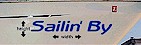
|
| Select
a Size |
|
| NOTE:
This represents
the total height
and width of the
decal. The size
will effect the
cost of the decal
as shown. |
|
|
| STEP
2 - Enter The Phrase Or
Wording |
|
|
|
| STEP
3 - Select a Font for Your
Decal |
|
EXAMPLE:
Hutrounded
|
| Select
a Typestyle |
|
| Normal
or Italic? |
|
| |
|
|
| STEP
4 - Select a Color for Your
Decal |
|
EXAMPLE:
Dk
Blue
|
| Select
a Color |
|
| |
|
|
| STEP
5 - OPTIONAL - Shadow, Outline
or Symbol Color |
|
|
|
| STEP
6 - OPTIONAL - Comments |
|
| Comments
(Optional)
|
|
| NOTE:
Enter any additional
information needed
to create your custom
decal, including
extra symbols as
shown or other extras
you need.
|
|
|
| STEP
7 - Quantity Of Decals |
| Quantity
|
|
| NOTE:
The quantity represents
the number of decals
you need. We can
provide discount
pricing for orders
over 6 pieces..
|
|
|





